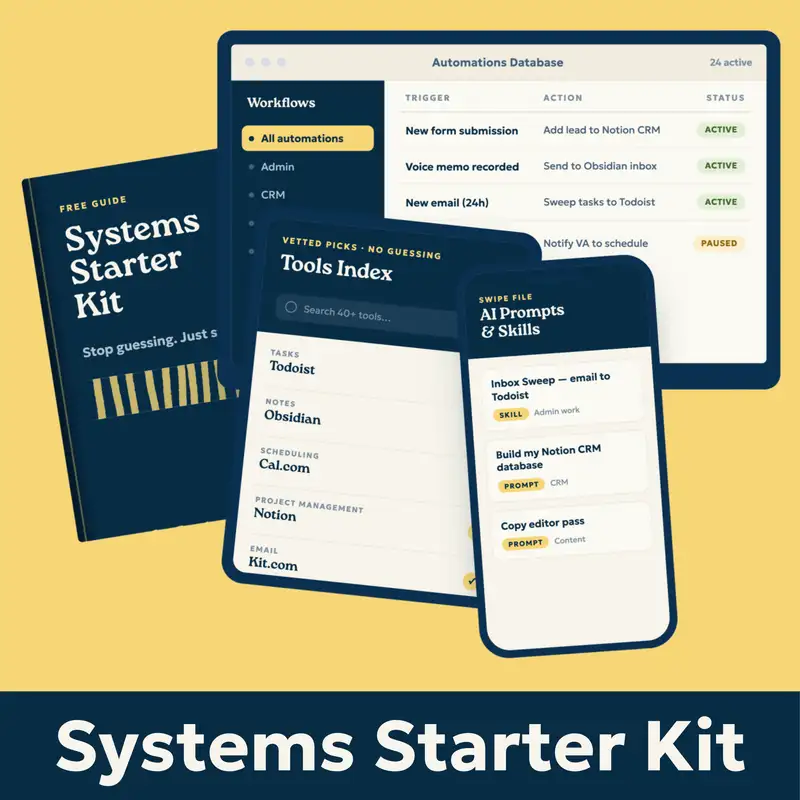
A few months ago I was doing a series of research calls when it became evident that thinking in systems is not something that everybody does. Throughout these calls I got perhaps the most important feedback I've gotten since moving away from web development. The person I was talking to said, I read all of your stuff and I'm always like this sounds awesome, but I don't even know where to start or how to ask. And some version of this quote came up multiple times throughout these calls. So I decided I would finally solve this problem of Solopreneurs not knowing where to start when building systems. I want to make it as easy as possible for you to start, which is why I put together the Solopreneur System starter kit. It's available now and today I am going to walk you through the four systems.
Every Solopreneur needs to run a business that allows them to take time off worry free. So, I'm gonna give you a high level overview of all four kits today or all four systems. And if you wanna get your hands on this resource, this is the most valuable thing I've ever created and it's completely free. You can get it at streamlined.fm/kit. You will get the full document that tells you not only what the systems are and why you need them, but my systems. And then the simplest version of each of those systems. It will give you a full tools index of all the tools I recommend for you to build these systems and it will give you an automations and AI prompts swipe file. So again that's over at streamlined.fm/kit. But in this episode I'm going to tell you why we have these four systems and why you need them.
Hey everybody, and welcome to another episode of the Streamlined Solopreneur, the show that helps you automate your business so you can take time off worry-free. I'm your host, Joe Casabona. And here's the problem.
Most people don't think in systems. I remember the first time I went to my accountant. I was probably 19 and I figured it was time for me to start my side hustle or treat my side hustle of building websites as an actual business. I had been reading books on how to start a business and one of those books talked about the shoebox method for accounting, which is just shoving receipts into a shoebox and letting your accountant sort that out later.
That sounded like madness to me, but I thought I'd play a little joke on my accountant who was also a family friend and I told him that's what I was doing. And I will Never forget the look on his face. Wide eyes, mouth agape, cold sweat forming on his brow before I told him I was kidding. Because even then, 20 years ago, I knew the importance of having a good system. I was a pretty sloppy kid, to be honest with you. Ask my parents or my college roommate.
But I knew in my business, in schoolwork and in work work, I need to be organized if I'm going to excel at anything. And that's ultimately why I moved from web development to podcasting to now helping solopreneurs. Because I know how hard it is for people to build systems and think in systems and build something that lets them confidently take time away from their business.
I had a panic attack six years ago as I record this, and the systems I put in place are the thing that helps me now stay calm and not freak out and not be working all the time so I can spend time with my children, with my wife, away from my desk. So that is why we need good systems. Because the truth is, being a solopreneur doesn't mean that you need to do everything yourself. You don't need more work. I think that people believe that busy is equivalent to being productive, but it's not. Right. You can, if your car is stuck in the mud, you can split your wheels all you want, but you're not getting out of the mud. You need productive work.
You need a couple of people to help you push your car out of the mud.
So not having a system in place means that you might be busy, but you're not being productive. You're not using your time wisely, and if you're anything like me, you left full time employment to get time back. And that's what these four systems, the four, I've been teasing them. But the four systems are: admin work, your CRM, content creation, and idea generation and capture. So I'm going to walk you through the why and what these systems are and why they're important. And I'm going to refer you to streamlined.fm/kit if you want to get the whole thing.
So, let's start with the admin work. I put the admin work first because it could potentially have the biggest impact, right? You should have a system for capturing your daily work, calendar, events, notes, tasks, and actionable items from meetings and email. Luckily, there are a lot of default apps for pretty much all of these. But a system isn't just a bunch of apps; it's making those apps, those tools work together.
And so there are a few questions that you should ask yourself as you're putting together your system for admin work. The first is how you can protect the time on your calendar so that you can do your best work? How are you capturing tasks into a task manager you'll actually use? Are you able to quickly capture notes and put them someplace where they don't get lost to history? And how are you getting your most important action items from meetings and emails while still being fully present?
And there are a couple of really important things here, right? The first is, a lot of people believe if it's important enough, I'm not going to forget it, or it'll come back to me. That is demonstrably not true. We forget things all the time, especially as we get older or we have more things going on. My mind was a steel trap when I was the only person I had to think about taking care of, when I was the only person whose well-being, you know, was important to me most of the time, as long as I wasn't with my parents or brothers.
Now I have a wife and three kids, so my brain is constantly thinking about their well-being as well as doing all of my work stuff. So we will forget things, and being able to capture them in a place that's going to surface the information when we need it is really important.
The other thing is protecting your time. I want to recommend a book here called At Your Best. It's by Carey Nieuwhof, and he will walk you through in this book how to figure out when you do your best work, when you do your worst work, and how to structure your day so that you are doing your best work or that you're doing your most important work at your best time.
I know I'm at my best in the mornings, so I have no meetings from 7 am to 11 am, and that time is sacred to me. I know I'm at my worst from 2 pm to like 4 pm So, I will put meetings or work that doesn't require a lot of energy at that time. Or, maybe I'll just go to the gym or go for a walk because I know I'm not going to get any productive work done at that time. So understand how you work and then use your system to protect your best time. Use a calendar app or a scheduling app and make sure that you have lots of time blocked off on your calendar so that you can dig into your important work without interruption. That's what the at that's really the admin work system is twofold. It's protecting your time, and it's surfacing the information you need when you need it. So that is the admin system.
Now, let's move on to the CRM. That's the second system in this kit. CRM stands for Customer Relationship Management. And most simply, it's a way to capture, nurture, and convert leads into customers or clients. And there are entire industries and enterprises based on this niche. But your CRM does not need to be complicated. I always recommend starting with something simple that you'll actually use. Big honking CRMs can be super overwhelming and require a lot of access to other accounts right off the bat. And that's what prevented me from implementing a CRM in my business for a long time.
And I'll say here, HubSpot is a former and current sponsor of my content over on YouTube and LinkedIn, and they have a free CRM, and it's really good. I use it now because I know what I need. But you can use something basic like Notion or whatever, a Google Sheet. And the really nice thing about Notion into Google Sheet is when you're ready to graduate to HubSpot for free, you can export, right? They make onboarding pretty painless.
But a CRM, here's how important a CRM is. In 2025, I added $20,000 to quarter four simply by following up with leads from earlier that year. Most people won't just reach out when they need you. Most people need a nudge, and the CRM is a place for you to know who to nudge and when. So when you're thinking about your CRM, I think consider these requirements. People should be able to fill out a form and automatically get and be automatically sent to your CRM. You should also have a way to set up reminders or follow ups so that you don't forget.
You should track the status of your leads to see how effective your outreach and sales are. It doesn't have to be a lot, it could just be like a new lead prospect or a pad sales call proposal sent one lost, maybe later work complete. Right? Something to just let you know how things are going, and make it something that you'll actually use. Like I said, if you think that Google Sheets is the place where you're most comfortable, start there and upgrade later.
Now, the last thing I want to say about CRMs in general. Again, you can get the full walkthrough, recommended tools, and recommended setup in the kit over at streamlined.fm/kit. But I think that forms are really a linchpin of the CRM, and I think you should have three kinds of forms: your call scheduler.
So like a calm or calendly.com, a mailing list, opt-in and lead capture forms. These are the ways that people will raise their hand and tell you they are interested in what you are doing. So I think you should have all three of those forms now.
Now is also a really good time for me to mention my fewest links philosophy, which is that the fewer links in the chain, the better. Big, complicated automations are fun, but the more links there are, the more likely something is to break. Direct integrations or one-step automations are often best from a reliability standpoint.
And this is why I think a tool like HubSpot is really good and important. Because a lot of HubSpot has direct integration to a lot of things. They even have their own form builder. So that is something to consider when you're building your CRM. Make it something you'll actually use, and make it something that is easy to get people into and something that will remind you to actually follow up with those folks.
Now, in the kit, I also talk about like customer onboarding, that's a whole other animal. I actually don't make it its own. Like this could have been like five systems, but I do talk a lot about that in the actual system starter kit. Cause that's something else to consider and something that can piggyback right off of your CRM.
Okay. Content creation. If you are a solopreneur, this is the third system. Content creation. If you're a solopreneur, you're likely creating some sort of content. Videos, podcasts, articles, newsletters. And having a good system in place for this is important to be consistent without feeling overwhelmed. So you should have a system for this. And again, it could be a Google sheet, it could be Notion, whatever works best for you.
But you should consider these things: How are you capturing ideas, which we'll talk about more in the next section. What the idea approval process looks like, and how you're tracking the status of multiple pieces of content. This one's really important, right? On Mondays, I protect my time. I have no meetings on Mondays. Mondays are my recording days. My kids are at my father-in-law's. I know the house is quiet. So I have five podcast episodes I'm recording today and at least one YouTube video.
And I wouldn't know, I wouldn't be able to record all five of those episodes today if I didn't know what I was talking about. And so having a system that allows me to look at my content schedule and review everything and then record is really important for you to batch content. Otherwise, you're just running around every week, going, " What am I going to talk about? How am I going to talk about it?” And that increases the length of the content creation process. What tools are you using to create the content? How is that content getting edited and reviewed again?
In my system, editing is really easy because I do a lot of stuff on the front end to make sure I don't have to edit on the back end. What goes into publishing? How are you promoting it? How are you repurposing your content? And maybe most importantly, what is the goal of your content? The goal of your content is going to dictate how often you publish and on what platforms. It's also going to determine your CTA. I have one call to action in this episode. Get the Solopreneur System Starter Kit.
My goal is to get people onto my mailing list. That's the goal of this podcast and my YouTube channel. People should know I know what I'm talking about and want to learn more. So, understand what your goal is because it's going to affect everything else.
I also want to mention repurposing here, right? The reason that I am so proficient and I can publish to a lot of places is because I repurpose. I write my newsletters, and then I look at my newsletters to see which would make good podcast episodes. How can I combine these to make a full episode out of it? What do I talk about in my newsletters that could be good? Show and tell YouTube videos, and how can I chop these newsletters down into a social post? All of that is because it all lives in my planner, inside of my system. So a planner goes a long way. I'm not going to tell you which one to use in the kit. In the System Starter Kit, I do tell you what I think you should use if you don't know where to start.
The last thing I'll say in this section is I've basically written a treatise on AI and creative work. The line is going to be different for everyone. For me, I don't think it should touch anything until post-production. And so when I use AI to speed up my content process, it's strictly on the back end. Very few times I will say, take this really long written work and turn it into an outline for a podcast episode.
But it's really just taking the headlines from my article at that point. It suggests a bunch of stuff, but I don't really pay attention to that stuff. So it should really, for me it's post-production work. That line is going to be different for everybody.
Okay. Also, I should say that I have like a lot of other opinions about AI and I'm sure you've heard them if you've a long time listener, if you are a longtime listener. But the important parts of your system are capturing ideas, giving yourself a way to plan content ahead of time so you can batch it and repurpose.
Okay. The last system, idea generation and capture. Every solopreneur should have this. It's a way to quickly capture ideas. We all have ideas. Maybe you're wondering why it wasn't part of another system, but I think an idea can slot into any of these systems. And so you want to have a separate place to capture and evaluate ideas. That's not mucking up the works for your CRM or your content planner or your admin work. Right. Like if you just threw every idea you had into a task manager, that would muck up your task manager.
So I like to put my ideas someplace separate. I put them in Obsidian. That could be different for you. That's not really the point of the idea capture system. The point of the idea capture system is to make it easy for you to capture ideas wherever you are. So you want to ask yourself these questions. What devices do you use, and what devices do you usually have with you? What apps do you use to take notes? What apps are you using? With the other systems we've talked about here, do you prefer to write, type or talk? Because that's also going to affect how you capture things and how you evaluate ideas.
I share my full system here, but I mostly use Obsidian for everything. And so I make it very easy for me to capture to Obsidian. No matter what I'm doing, my Voice Memos app will automatically send notes to Obsidian. I have a button on my lock screen for me to automatically put a note in Obsidian or to quickly put a note in Obsidian. S
o you want to capture ideas as quickly as possible because you will forget them. So this is why the system is different, because ideas can apply to any place you want to capture ideas. And then maybe once a week, maybe when you're not at your best, right when you're in one of your less productive times, you can just go through and say, " Oh, this was a good idea. I'm keeping this. This is a terrible idea; get rid of it. But you want a place to quickly capture ideas and you should make it one place.
I've talked to solopreneurs. I've experienced this myself, where I have ideas in a bunch of different apps, and I thought this is silly. Obsidian is where all of my notes go now, except for one note I've shared with my wife in Apple Notes because I'm not going to subject my wife to Obsidian. So everything else, everything from my work, all the ideas I have, all goes in Obsidian. Once a week during my weekly startup routine or my weekly planning session, I will go through my ideas inbox or my notes inbox in Obsidian, and I will process them. You should do the same thing.
So, those are the four systems: Admin work, CRM, content creation, idea generation, and capture. They can all interconnect if you want, but you don't need to build them all at once. I would say pick the one that feels the most urgent and the most chaotic right now and start there.
Over at streamlined.fm/kit, I'll have a link in the description too. streamlined.fm/kit. You can pick the system, and then there is a section on how to implement it. So insanely valuable resource. It has the simplest version of each system, the exact tools, and you get automations and AI prompts all laid out in the free Solopreneur System Starter kit.
But that's it for this episode. Thanks so much for listening to the Streamlined Solopreneur, and until next time. I hope you find some space in your week.